AI Moodboards: Plan Real Shoots Without Confusing Clients
By 9,6Hz Agency
Published
Use AI moodboards to discuss light, framing and atmosphere. Label concept images clearly, then check locations, products and what a real crew can shoot.
An AI moodboard is a collection of generated concept images used to discuss a visual direction before production. It can help you compare window light, camera height, colors or the arrangement of a room. It does not demonstrate that a location exists, that a product will look that way on camera, or that a crew has already produced the scene. Keeping those differences visible is what makes the board useful.
9,6Hz Agency uses AI to support daily work while keeping real filming at the center of its video production. That position allows clearly disclosed AI illustrations and concept exploration. It does not turn a generated image into portfolio evidence. This article explains a suggested planning workflow, using a fictional ceramic-cup film rather than a claim about a client job.
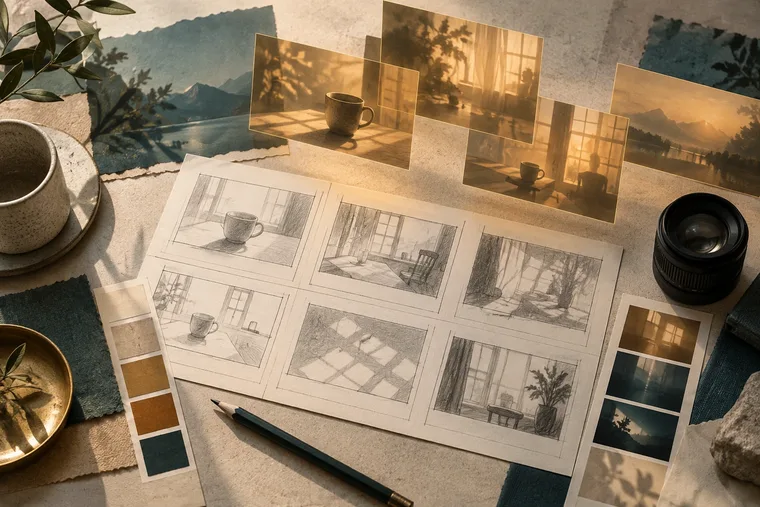
AI-generated editorial concept: imagined frames beside practical planning materials. This is not BTS or a client project.
What decision should a moodboard help you make?
Start with a question a producer or director can answer. “Should the cup feel quiet and domestic, or bright and graphic?” is a useful question. “Make something cinematic” is too open: a model may add smoke, a dramatic sunset and a marble kitchen that have little to do with your brief. Attractive details can quietly become expectations if nobody explains why they are there.
Write the intended use beside the board: a direction discussion, not a finished frame, a location proposal or an approved shot list. Ask the client to respond to specific variables. They might choose the soft side light while rejecting the room, or approve the low camera angle while asking for more space around the product. Those are separate decisions and should stay separate in the meeting notes.
A moodboard should also leave room for disagreement. One clear alternative often helps more than many nearly identical pictures. You are not asking the client to rank the model's output. You are finding which visual choices serve the brand, audience and action in the film.
How do you separate references, concepts and real work?
MaterialWhat it helps discussWhat it does not establishExisting reference, with its sourceA specific quality of light, movement or texturePermission to reproduce the complete ideaAI concept, explicitly labeledA possible visual directionAn existing set, shoot or finished resultRecce or camera-test photographConditions observed at a real location or testThe full film's final lookAuthorized finished project frameWork actually deliveredWhat an unrelated future shoot will achieveKeep these groups recognizable in a deck. Do not place a generated room between real portfolio frames under one vague “our work” heading. For a concept, use a visible caption such as “AI-generated lighting concept; location and product appearance to be confirmed.” A folder name alone is insufficient when the picture is copied into a presentation or forwarded without context.
What should you put into the image prompt?
Describe choices that relate to production: the subject, action, setting, composition, direction of light and the role of the frame. For the fictional cup film, a starting prompt might request a matte ceramic cup on a plain wooden table, soft daylight from camera left, an eye-level medium close-up and space to the right for a future title. Specify that it is a concept illustration.
Avoid asking for a recognizable person's face, a competitor's exact advertisement or the signature style of a named creator. Instead, explain the qualities you want: restrained contrast, a cool background, a patient camera move, visible ceramic texture. This gives your team a vocabulary they can use when choosing a location and lighting setup.
Generate alternatives by changing one meaningful variable. Compare side light against backlight while keeping the product and framing stable. If every version changes the room, lens impression, palette and action, you cannot tell which choice the client is approving. Save the prompt and selected image together so later revisions have a clear starting point.
Which details need a reality check?
Inspect the picture like a production plan. Can the proposed window deliver light from that direction at the intended shoot time? Is there space behind the table for a camera and focus puller? Does the product have the correct handle, proportions and finish? Can the background remain clean in both landscape and portrait delivery?
Generated highlights can imply several incompatible light sources. A model may show a soft reflection on one side and a hard shadow pointing toward it. Those inconsistencies may still look appealing in a small deck. They become expensive when a client expects the image to be recreated literally. Turn the approved direction into a lighting sketch and test photograph before treating it as a production commitment.
Check actions too. Steam suspended in a perfect shape, liquid that never spills and a hand that grips an impossible handle are not instructions a crew can follow. If the film needs a pouring action, plan the pour, reset, continuity and sound. A moodboard can suggest atmosphere; a camera test reveals whether the action reads.
How do you turn an approved concept into a shootable plan?
- Record the approved qualities: light, composition, color and emotional tone.
- List imagined details that remain unconfirmed: location, props, wardrobe, weather and product finish.
- Build a shot list around visible actions and the story's progression.
- Recce the location and test the product in the proposed light.
- Update the deck with real test frames, explaining any changes.
- Confirm the resulting scope, schedule and practical requirements before filming.
For the cup example, “warm light on the rim” can become a controlled lighting objective. “A sunlit loft with a skyline outside every window” may require a different location or a constructed background. Discuss that implication while there is still time to change the idea. Neither the generated image nor an enthusiastic comment in a meeting should silently approve extra production scope.
What should the client approve?
Separate approval of the visual direction from approval of the execution. A useful note might say: “Soft lateral light and a quiet wood-and-ceramic palette approved. Set layout, actual cup appearance and opening action pending test.” This preserves the creative decision without promising an identical image.
Present the tradeoff when you replace an imagined detail. If a real location lacks the enormous window in the concept, show a lighting test that delivers the same feeling. Explain what the audience will see rather than apologizing for not matching an impossible room. The test gives everyone a more dependable basis for choosing.
How should you think about image rights?
Check the specific model, service terms, input permissions and intended distribution. Adobe describes the training sources for its initial commercial Firefly model; that description should not be generalized to every generative model or partner model. It also does not remove the need to review the actual output.
A generated image may still contain a recognizable trademark, person or close resemblance to another work. Remove or reconsider such material before sharing. Do not promise that a paid subscription makes every output free of rights concerns. Keep source records for reference images and record what you were authorized to upload. For sensitive or unreleased material, check the service's data policy before using it as an input.
How do you review the board before sending it?
View the final deck at the size the client will actually use. Captions that look readable on a large monitor may disappear on a phone. Ensure a concept cannot be mistaken for a real project when a single page is shared. Read the page title, caption and surrounding copy together; a disclaimer at the end does not repair a misleading headline.
Remove decorative frames that do not help a decision. If an image adds a second location or a new character with no story purpose, it may create more work than clarity. Keep enough variety to compare the direction, then use notes to explain what each selected frame is testing. A concise board with clear choices is easier to approve and translate into production.
Common questions
Can an AI moodboard replace a storyboard?
It can support a storyboard, but a storyboard needs the order of actions, camera relationships and transitions. Beautiful standalone images may hide missing continuity. Add simple drawings or written action notes wherever the model's pictures leave the sequence unclear.
Must every concept appear exactly in the final film?
No. Agree which qualities are targets and which details are provisional. Final images depend on the actual subject, location, performance and production choices. Clear approval notes make that evolution understandable.
Can you publish the moodboard as a case study?
You can discuss concept development if disclosure and input permissions allow it. Label the generated material and distinguish it from footage or delivered work. Do not imply that the board proves a completed shoot.
Sources were checked on 10 October 2026. The cup example and this article's image are illustrations, not a documented client project. For related planning, read the pre-production checklist and explore the portfolio. Bring your brief to 9,6Hz Agency to discuss what should be imagined, tested and filmed.